Permissions
The Permissions tab allows you to manage user privileges and configuration. To access it, navigate to the Portal, select Settings from the left pane, and click Permissions under the Setup menu.
To enable permissions for an entire group, select the checkbox in the Group column. To enable it for a specific role, select the checkbox under the corresponding Role column.
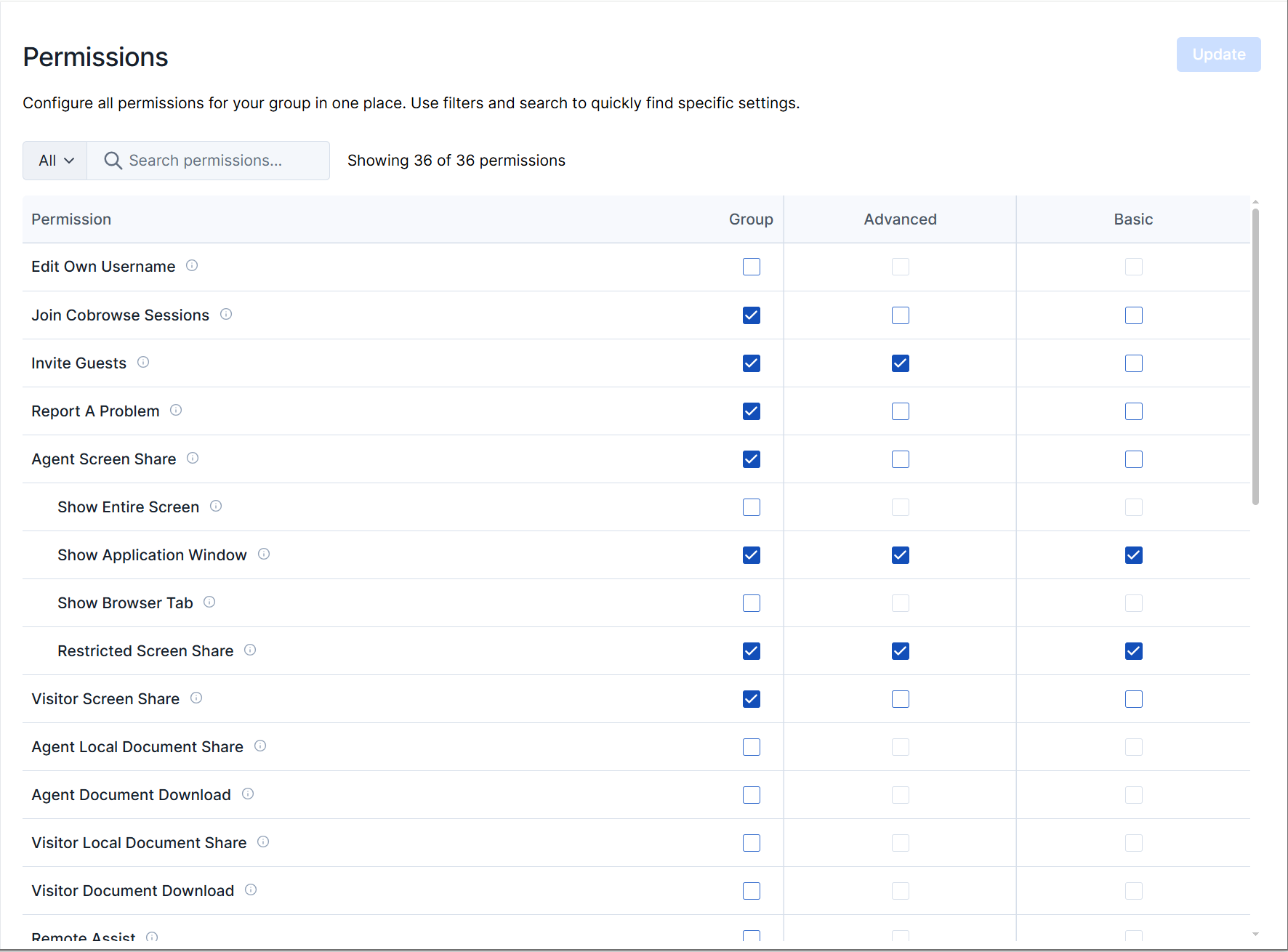
| Permission Name | Description |
|---|---|
| Edit own username | Allows the user to update their Glance username. |
| Join Cobrowse sessions | Allows the user to conduct Cobrowse sessions. |
| Invite guests | Allows the user to invite guests to a Cobrowse session. |
| Report a Problem | Enables the Report a Problem button within the Agent Console. |
| Agent Screen Share | Allows the user to share their screen during a Cobrowse session. |
| Show Entire Screen | Allows the user to share their entire screen during a Cobrowse session. |
| Show Application Window | Allows the user to share a specific application window during a Cobrowse session. |
| Show Browser Tab | Allows the user to share a browser tab during a Cobrowse session. |
| Visitor Screen Share | Allows the visitor to share their screen during a Cobrowse session. |
| Agent Local Document Share | Allows the user to share a local document during a Cobrowse session. |
| Agent Document Download | Allows the agent to download a document that was shared with them during a Cobrowse session. |
| Visitor Local Document Share | Allows the visitor to share a local document during a Cobrowse session. |
| Visitor Document Download | Allows the visitor to download a document that was shared with them during a Cobrowse session. |
| Remote Assist | Enables the Remote Assist button within the Agent Console. |
| Restricted Editing | Enables Restricted Editing during a Cobrowse session. |
| Navigation Assist | Enables the Navigation Assist button within the Agent Console. |
| Screen Reader Gesturing | Enables Screen Reading for a visitor during a Cobrowse session. |
| Agent Accessibility | Enables Agent-Side Accessibility during a Cobrowse session. |
| Start Screen Share Session | Allows the user to start Screen Share sessions. |
| Join Screen Share Sessions | Allows the user to join Screen Share sessions. |
| Keyless Sessions | Enables Screen Share sessions to be started without a Join Key. |
| Show Screen | Allows the user to show their screen during a Screen Share session. |
| Guest Remote Control | Allows the guest to control the user’s mouse during a Screen Share session. |
| Guest Share Screen | Allows the guest to share their screen during an agent-initiated Screen Share session. |
| View a guest’s Screen | Allows the user to view a guest’s screen during a Screen Share session. |
| Agent Remote Control | Allows the user to control the guest’s mouse during a Screen Share session. |
| Guest Annotation | Allows the guest to gesture on the agent’s screen. |
| Agent Annotation | Allows the user to gesture on the guest’s screen. |
| Data Capture For Name, Phone, Email | Enables Glance to capture a guest’s name, phone, or email when they join a session. |
| Guest Video (Mobile SDK) | Enables guest video during a Mobile SDK session. |
| Agent Video | Enables agent video for Cobrowse and Mobile SDK sessions. |
| Agent Video Background Effects | Enables agent background effects for Cobrowse and Mobile SDK sessions. |
| Visitor and Guest Video | Enables guest and visitor video during Cobrowse. |
| Mobile Camera Share | Enables the visitor to share their mobile camera. |