Script Tag
The Script Tag page allows Glance administrators to modify attributes to create a custom script tag that enables Cobrowse on websites. This interface lets users fill out each individual attribute for the script tag and then generate a script that can be copied and pasted into their website.
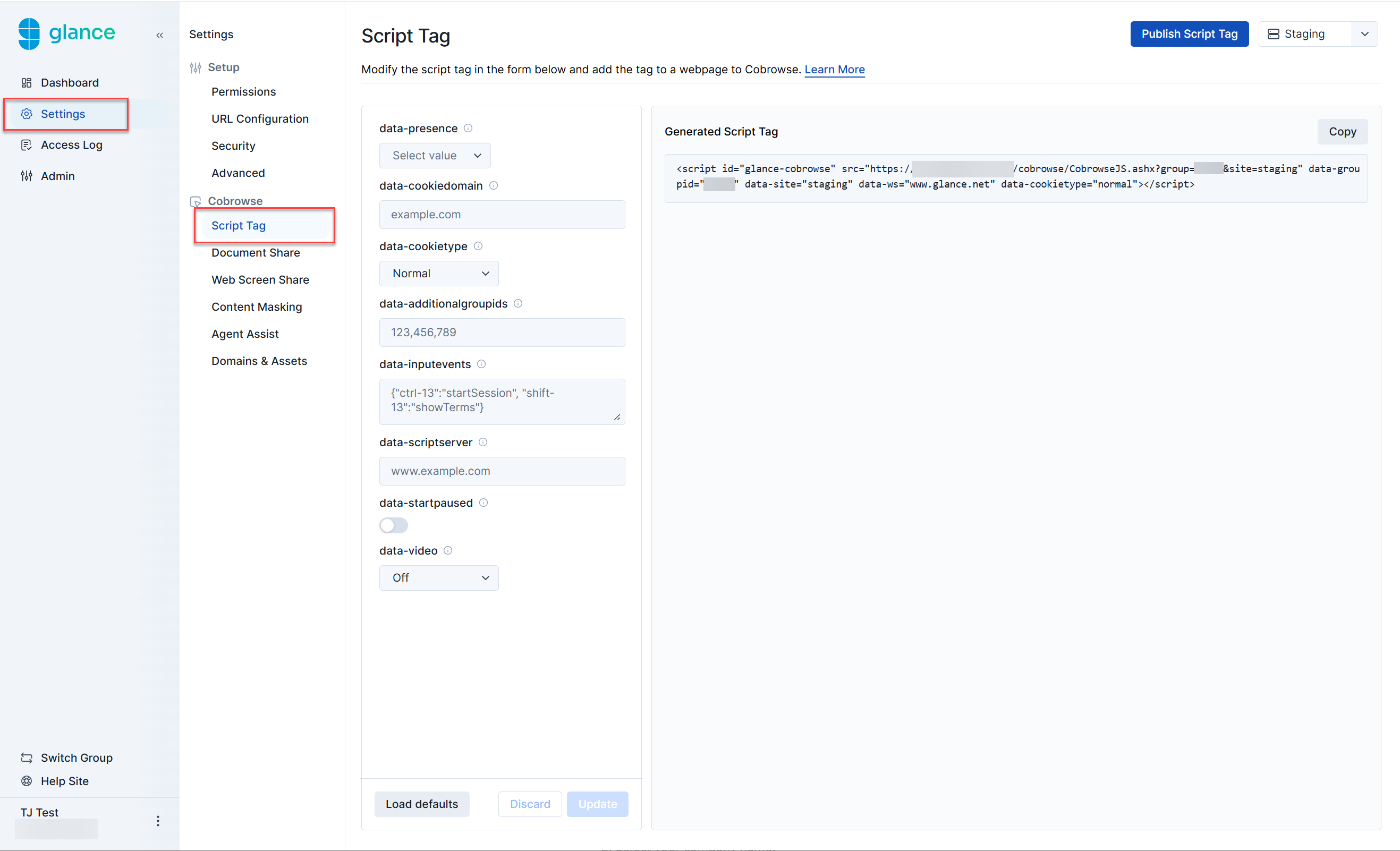
The following attributes can br found within the script tag.
Read Only Tag
Read-only attributes are generated based on previous selections made by the user. The following attributes are generated within the script as read only:
- script id - The identifier used for this script, defaults to
glance-cobrowse. - src - The source of the cobrowse loader script.
- data-groupid - Your assigned Group ID number provided by Glance.
- data-site - The environment (staging or production) that this tag will be deployed to. Select Staging or Production from the drop-down menu to identify what needs to be generated for this script.
- data-ws - The webserver being used (e.g.,
www.glance.net). When implementing the script tag on your website, this can be changed for use in beta or a customer-specific environment.
The Cobrowse script tag includes your company’s unique Group ID. If you have multiple Glance groups, make sure the correct Group ID is in the tag, and that you are joining sessions as a Glance user in that group.
Script Tag Versions: Staging and Production
There are two versions of the script tag: one for your staging website, and one for your production website. Which profile of Cobrowse is used on your site is specified by the site attribute in the script tag. You should use Staging for your own internal staging environment and Production for your live site.
Cobrowse will not work on a website accessed at localhost with the file://protocol. If you are trying out Cobrowse on a local website, please access it via a host name added to your local hosts file or equivalent.
Basic
data-presence
Definition: Determines if the presence scripts are loaded and when the connection is made to the presence server. Omit this attribute if you are not using presence.
Default: on
Options: on, off, Api
- on will load the presence scripts and automatically connect to the presence server if a visitor id is defined in the
data-visitoridscript tag attribute. - off will not load presence scripts.
- api will load the presence scripts, but it is the customer’s responsibility to manage the connection and other aspects of the interaction. See Presence Visitor API.
data-cookiedomain
Definition: The domain to use for the Cobrowse session cookie. This setting is typically required only for staging sites hosted on a public suffix domain such as azurewebsites.net or herokuapp.com. Specify the full host name as the cookie domain. For example, if your staging site is abcco.azurewebsites.com, specify data-cookiedomain="abcco.azurewebsites.com"
Default: N/A
Options: Hostname of page to be Cobrowsed
data-cookietype
Definition: The type of cookie to use for the Cobrowse session. Possible values include the following:
- normal (default): A non-secure cookie on your website domain. Use this value if visitors need to be able to navigate to insecure pages during a Cobrowse session.
- secure: A secure cookie on your website domain. You may use this value if visitors will only need to be able to navigate to secure pages during a Cobrowse session.
- ls: Local storage on your website domain. You may use this value if you would like to avoid adding a cookie to your domain, and if your visitors only navigate to pages on the same local domain.
- dual: Both local storage and a cookie are used. Use this value if you have existing code which may delete cookies on your website domain, including the Cobrowse session cookie.
Default: normal
Options: normal, secure, ls, dual
Advanced
data-additionalgroupids
Definition: Specify additional Group IDs in the script tag, for example: data-additionalgroupids="59923,50920". It is possible for you to tag different pages with different sets of group ids, but a primary Group ID (data-groupid) must be specified and it is used as a default.
Default: N/A
Options: Comma separated list of Group IDs
data-inputevents
Definition: Maps input events to Glance Cobrowse actions. The data-inputevents format is { "[modifier]-[keycode]" : "[Glance action]", ...}.
Example:
data-inputevents='{"ctrl-13":"startSession", "shift-13":"showTerms"}'Default: N/A
Options: The key code can be any standard JavaScript key code mapped to Cobrowse actions.
Use single and double quotes exactly as shown in the above example. The outer quotes around the attribute value should be single quotes, and the quotes within the attribute value must be double quotes. Customers should still provide a link or button in addition to the key combinations to allow for starting sessions on mobile devices.
data-scriptserver
Definition: If you are hosting the script on your own server, add this attribute to tell Glance where to find the additional script and CSS resources that you host.
Default: N/A
Options: [servername]
data-startpaused
Definition: Allows you to start the session in a paused state. Enabling sets data-startpaused="1".
Default: off
Options: on, off
- on starts the session in a paused state.
- off starts the session in an unpaused state.
data-video
Definition: Starting video size.
Default: N/A
Options: small, large, off